
To use dictation, install a speech service first.
Set up a speech service
- Install Offline Speech to Text, available on Zapstore.
- After you install it, open it and follow its setup steps, including any model download.
- Then go back to White Noise, open Settings > Dictation, and select a service listed as available.
Which services appear depends on what is installed on your device. The table below shows how each type of service works with White Noise.
Dictate a message
With Offline Speech to Text, audio is processed on this device. Other speech services may send audio to their provider.
In a conversation, tap Dictate text. It turns your speech into text that you can review and then Paste or Send, so it never sends a recording. To send audio, hold the voice control instead, as described in Voice messages.
Dictation controls
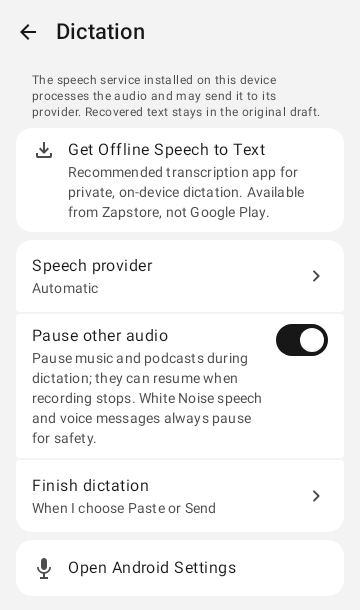
| Control | Effect |
|---|---|
| Get Offline Speech to Text | Opens the Zapstore page for an app that transcribes speech on this device. It is unavailable on Google Play. |
| Speech provider | Automatic or a specific provider. Android's selected speech service takes priority. If none is selected, White Noise uses the provider you choose here or, when there is only one engine, that engine. Each provider is labeled Works inside White Noise, Opens provider window, Keyboard only, or In-app support not verified. Choosing a provider leaves your audio and draft untouched. After you choose one, tap dictation again to start. |
| Pause other audio | Pauses music and podcasts while you dictate. White Noise speech and voice messages always pause. |
| Finish dictation | When I choose Paste or Send, or after a set number of seconds of silence. |
| When finished | Paste into draft lets you review the text first. Send message sends only if the chat and the draft are unchanged. |
If sending is blocked, any recognized text is put back into the original draft, so review it before you send again.