
Translation is handled by Offline Translator, a separate app that runs translation on your device. White Noise passes message text to that app, and you manage language packs inside it.
Privacy: Offline Translator can write message text and translations to Android system logs. White Noise can't guarantee the security of text handled by another app.
Set up Offline Translator
The current reviewed White Noise Android build only works with Offline Translator signed by its original developer, versions 0.8.3, 0.8.4, and 0.8.5. White Noise does not automatically accept newer versions. Each new version must be checked for compatibility before White Noise supports it.
- Install Offline Translator.
- Open Offline Translator and install the language packs you need. Install a pack for each language you want to translate from and into.
- Return to White Noise. Touch and hold a text message, then tap Translate.
- Choose a Source language and Target language, then tap Translate. You can use Detect language for the source.
When the translation appears, tap Show original to see the original text. Tap Show translation to switch back. See Translate a message for the message controls.
Troubleshooting
- Translator is unverified or unsupported: White Noise did not send any text to it. Install a supported version from the link above.
- The language can't be detected: Choose the source language yourself, then try again.
- The source language pack is missing: Open Offline Translator, install the pack for that language, then try again.
- The translation engine fails: Open Offline Translator, check that the language packs you need are installed, then try again.
Global settings
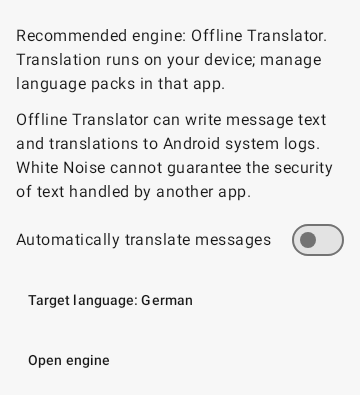
Open Settings > Translate.
| Control | Effect |
|---|---|
| Automatically translate messages | Turns automatic translation on or off for every chat that uses the global setting. It starts off. |
| Target language | The language messages are translated into. It starts as English. Choosing a language from the list leaves its language pack uninstalled until you add it in Offline Translator. |
| Open engine | Opens Offline Translator, where you install and manage language packs. |
If you turned on automatic translation in an earlier preview build, White Noise switched it off once, along with any chat set to On, so you can read the logging notice before you turn it back on.
One chat
Each chat has its own Automatically translate messages dialog, saved separately for each profile. Changes apply as soon as you make them, and Close dismisses the dialog.
- Use global setting follows Settings > Translate. On or Off overrides it for this chat only.
- Use global target language starts checked. Clear it to pick a different Target language for this chat.
- Open engine opens Offline Translator.
These settings store your choices only. Message text and translations are kept out of them.